Sponsored Products optimization is not about lowering ACoS every day. It is about getting the right traffic, at an economically sensible price, for the products and campaigns that deserve the spend.
The fastest way to make a Sponsored Products account worse is to treat every problem as a bid problem.
A search term can be irrelevant, relevant but expensive, under-tested, or genuinely strong. Each situation needs a different action.
Start with the search term, not the keyword
Keywords are your targeting inputs. Search terms show what shoppers actually searched for.
That distinction is critical.
Open the Sponsored Products Search Term Report and look for:
- Search terms generating sales
- High-spend terms with weak results
- Irrelevant queries
- New converting searches
- ASINs appearing through automatic or product-attribute targeting
Amazon says the Search Term Report can be used to identify high-performing searches, add them to campaigns, and create negative keyword or product targets for searches that do not meet campaign goals. The report currently has a 65-day lookback window.
Do not start with the highest ACoS keyword. Start with:
"Where is the advertising dollar going, and does that traffic make sense?"
1. Separate discovery from control
For many accounts, automatic and manual campaigns have different jobs.
Automatic campaigns
Use them to discover:
- Search terms
- Product targets
- New customer demand
- Search behavior you did not anticipate
Manual campaigns
Use them when you want more control over:
- Specific keywords
- Match types
- Product targets
- Bids
- Campaign budgets
A practical workflow is:
Automatic discovery → search-term analysis → proven target → manual campaign → controlled bid
Amazon recommends using automatic campaigns to discover keywords and products, then using search-term data to inform manual targeting.
2. Promote proven search terms
When a search term repeatedly produces useful sales, do not leave the entire opportunity buried inside an automatic or broad campaign.
Move proven demand into a more controlled targeting setup when it fits the campaign strategy.
For example:
Search term: insulated water bottle 32 oz
Spend: $84
Orders: 7
Sales: $315
That is very different from $84 spend and zero orders.
The first deserves an optimization question such as:
Can I capture more of this demand at an acceptable cost?
That could mean an exact-match target, an appropriate bid, or a dedicated campaign depending on the account structure.
Amazon's Target Promotion feature is designed to help advertisers harvest high-performing targets and reduce spend on low-performing ones.
3. Do not negative every poor performer
Negative targeting is powerful, but it is not a substitute for diagnosis.
Use a negative when the traffic itself is wrong.
Example:
You sell a premium office chair and receive repeated searches for replacement chair wheels.
The problem is relevance.
Use negative targeting.
But if the search is exactly for your product and receives clicks without enough sales, investigate:
- CPC
- Conversion rate
- Price
- Reviews
- Offer
- Placement
- Search intent
A relevant target may need a lower bid rather than a complete exclusion.
For a deeper treatment of this distinction, see how to set up negative keywords on Amazon.
4. Optimize bids from economics
Do not lower bids simply because ACoS is high.
Start with the economics.
A useful diagnostic is:
Advertising cost per order = CPC ÷ conversion rate
At $1.20 CPC and a 10% conversion rate:
$1.20 ÷ 10% = $12 advertising cost per order
At the same CPC and a 5% conversion rate:
$1.20 ÷ 5% = $24
The keyword did not necessarily become less relevant. The economics became worse, so check conversion before making an aggressive bid change.
For a broader ACoS framework, see how to lower ACoS on Amazon.
5. Use placement data before changing the campaign
Sponsored Products performance can vary significantly by placement.
Review:
- Top of Search
- Rest of Search
- Product Pages
Suppose a campaign has a 25% overall ACoS, but product pages consume 45% of spend at 70% ACoS while top of search produces 18%.
Lowering the entire campaign bid may damage the part that is working.
The better question is:
Which placement is creating the problem?
Amazon provides placement reporting and placement bid adjustments for Sponsored Products. Placement adjustments can be up to 900% in supported campaigns and marketplaces.
6. Fix budget allocation, not just bids
A campaign running out of budget is not automatically a campaign that deserves more budget.
Before increasing it, check:
- Sales
- Conversion rate
- ACoS or ROAS
- Marginal performance
- Campaign objective
- Whether another campaign is constrained
If Campaign A spends $100 and generates $500 in sales while Campaign B spends $100 and generates $150, moving the next dollar toward A may have a stronger economic case.
Do not blindly shift all budget to the highest ROAS campaign. Branded, discovery, and competitor campaigns may have different jobs.
Budget should follow the role and economics of the campaign.
7. Review the advertised product
Sponsored Products optimization is not only about targeting.
The advertised ASIN matters.
If an ASIN receives strong traffic but weak conversion, check:
- Price
- Main image
- Reviews and rating
- Offer competitiveness
- Variation setup
- Detail-page content
- Inventory availability
If the product does not convert organically either, increasing the PPC bid is rarely the first fix.
Amazon's own Sponsored Products guidance recommends checking the advertised products and detail pages when evaluating campaign performance.
8. Keep campaign structure decision-driven
Do not create separate campaigns just because you can.
Create separation when it changes a decision.
Useful reasons include:
- Different budgets
- Different products
- Different campaign objectives
- Brand vs non-brand
- Discovery vs control
- Different bidding approaches
- Different profitability requirements
If two targets always require the same budget, bid logic, and optimization decisions, splitting them may add management work without adding control.
For the broader architecture, see Amazon PPC campaign structure.
9. Change one major variable at a time
This is basic operating discipline.
If you simultaneously:
- Cut bids
- Add negatives
- Move keywords
- Change placement adjustments
- Increase budget
and performance improves, you do not know why.
Make changes that you can attribute.
For example:
Week 1: reduce bids on relevant but inefficient targets.
Review: compare spend, CPC, conversion, and sales.
Next: address search-term or placement waste.
Amazon also recommends limiting changes while testing strategies so performance differences can be attributed to a specific change.
10. Use a practical optimization cadence
You do not need to edit every campaign every day.
Early campaign
Review more frequently while the campaign is generating its first meaningful data.
Look for:
- Search-term discovery
- Obvious irrelevant traffic
- Bid outliers
- Budget constraints
- Conversion problems
Established campaign
Use a recurring review of:
- Search terms
- Targets
- Bids
- Budgets
- Placements
- Advertised products
Amazon's Sponsored Products guidance recommends monitoring metrics early in a campaign and making ongoing adjustments based on performance. For dynamic bidding, Amazon currently recommends reviewing bids about every two weeks.
The exact cadence should follow how quickly the campaign generates meaningful evidence.
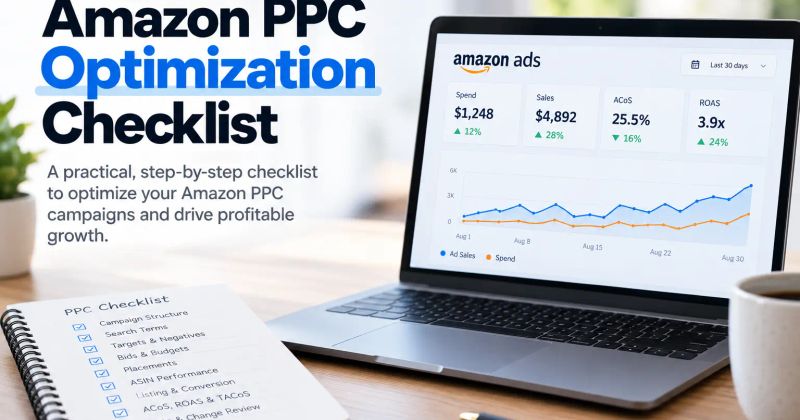
A Sponsored Products optimization checklist
Before making a change, ask:
Traffic
- Is the search or product target relevant?
- Is it generating useful sales?
Economics
- Is CPC reasonable for the conversion rate?
- Does the resulting advertising cost fit the product economics?
Control
- Should this target remain in discovery?
- Has proven demand earned more controlled targeting?
Waste
- Is the traffic irrelevant?
- If yes, should it be negatively targeted?
Placement
- Is one placement responsible for disproportionate spend?
Budget
- Is the campaign constrained for a good reason?
- Would another campaign make better use of the next dollar?
Product
- Is the ASIN converting well enough to justify additional traffic?
That checklist prevents the common habit of changing bids first and asking questions later.
Final takeaway
Optimizing Amazon Sponsored Products is a continuous decision process:
Find the traffic → classify it → measure the economics → choose the right lever → measure the result.
The right lever might be a negative target, a lower or higher bid, a budget change, a placement adjustment, a new manual target, or no change at all.
The goal is not to make the account look cleaner.
It is to make the advertising spend more productive.
For the broader framework across bids, budgets, search terms, targeting, and campaign decisions, see the complete guide to Amazon PPC optimization.
Key takeaways
- Optimize Sponsored Products from search-term and target-level evidence, not from campaign-level ACoS alone.
- Use automatic campaigns for discovery and manual campaigns for more controlled targeting.
- Separate irrelevant traffic from relevant traffic that is simply too expensive before choosing a negative or bid change.
- Use placement, budget, and product-level data to find where the next advertising dollar has the strongest case.
- Make fewer, more attributable changes so you know which optimization actually improved performance.
Frequently asked questions
Start with search-term and targeting data, then optimize irrelevant traffic, bids, budgets, placements, campaign structure, and product conversion based on the campaign objective.
About the author

Amazon Ads operators
Yogendra Kashyap is the Founder of SellerRoot and an Amazon Ads expert with 9+ years of experience helping brands grow through data-driven advertising. His expertise spans Amazon PPC, campaign optimization, search term analysis, and marketplace growth. Together with the SellerRoot team, he is building AI-powered tools for Amazon advertisers while sharing practical, experience-backed insights to help brands improve profitability and scale on Amazon.
Want this checked against your live account?
SellerRoot connects to your Amazon Advertising account and surfaces these opportunities continuously, with no manual reports required.